Technical Guides
Setup guides, troubleshooting, and how VoIP actually works — written in plain English.
What is VoIP?
VoIP stands for Voice over Internet Protocol — the technology that carries your phone calls (plus texts, faxing, and voicemail) over the internet instead of old copper phone lines. If you have a solid internet connection, you have everything a modern phone system needs. That’s the whole idea, and it’s why VoIP has gone from novelty to the default way businesses and households handle phone service.
One thing worth knowing in 2026: this switch is no longer optional for many. Carriers across the US are actively retiring their copper landline networks, and businesses still on traditional lines are seeing prices climb as the old infrastructure winds down. Understanding VoIP isn’t just about saving money anymore — it’s about what comes next.
A brief history of VoIP
Traditional phone service moved your voice as analog signals across a physical network of wires and switches (the PSTN — public switched telephone network). It worked, but it required an enormous amount of dedicated hardware, and every feature beyond “make a call” cost extra.
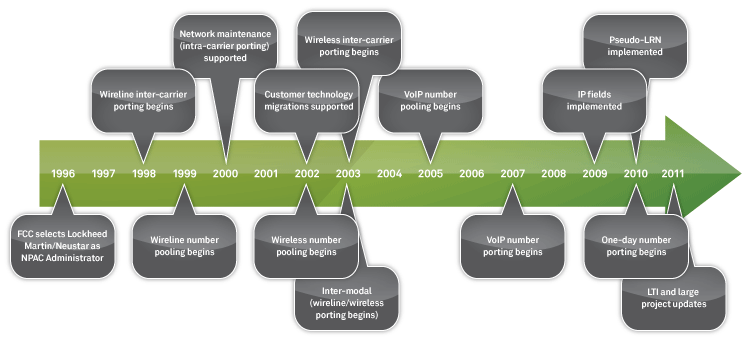
Broadband changed the math. The first mass-market VoIP services arrived in 2004, and what started as a way to connect office phone systems (PBXs) over the internet quickly became full phone service in its own right. The pitch was simple and still is: you’re already paying for internet. A modem, a router, and an Ethernet cable replace an entire telephone network’s worth of equipment — with no separate phone infrastructure to buy or maintain.
How does VoIP work?
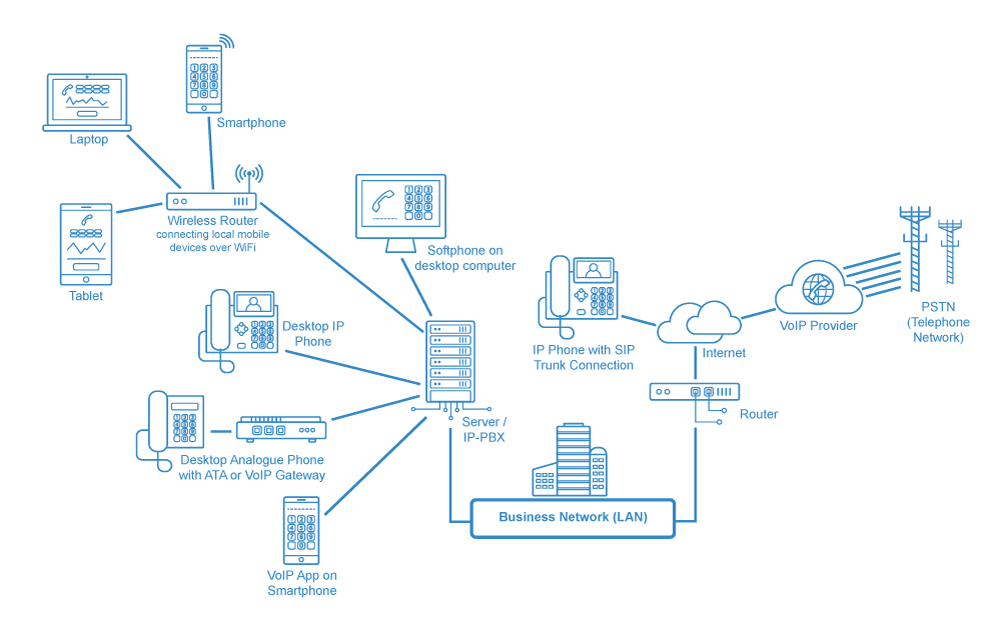
Every VoIP call starts with a way to capture your voice, and there are three ways to place a call:
- Softphone (computer or app) — An app on your computer or smartphone plus a microphone is a complete phone. Many options are free or nearly free, and quality depends mostly on your internet connection.
- ATA (analog telephone adapter) — A small box that converts your existing regular phone’s analog signal into digital data packets. Keeps the handset you like, sends the call over the internet.
- IP phones — They look like ordinary desk phones, but they plug into your router with an Ethernet cable (or connect over Wi-Fi) instead of a phone jack. Everything they need to place calls over the internet is built in.
What happens to your voice: your speech is sampled, digitized, and split into small data packets. Each packet carries a header with its origin, destination, and a sequence number, so the receiving end can reassemble your words in order, catch errors, and keep the conversation flowing.
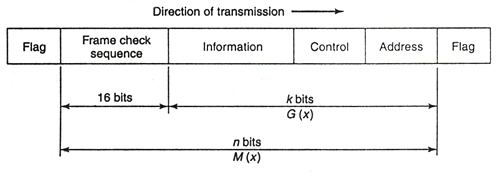
Circuit switching vs. packet switching: old phone networks held open a dedicated circuit for your entire call — reliable, but wasteful. VoIP uses packet switching, the same approach as email and the web: each packet finds its own best route to the destination. That makes the network efficient and gives it built-in failover — if one path fails, packets route around it. The trade-off is that a congested connection can delay packets, which is where VoIP’s occasional echo or lag comes from — and why call quality starts with internet quality.
Here’s what a full business VoIP setup typically looks like:
Why make the switch to VoIP?
Beyond “everyone else is doing it,” here’s what actually changes when you move off traditional phone lines:
A full communications suite, not just a dial tone
VoIP bundles voice, texting, faxing, and voicemail with the features businesses used to pay dearly for: auto-attendants, call routing, voicemail-to-email transcription, spam call blocking, conference calling, call recording, and detailed reporting — managed from a web dashboard instead of a wiring closet.
Freedom from hardware clutter
Hosted VoIP moves the phone system’s brains into the cloud. No on-site PBX cabinet, no proprietary wiring, no fax machine gathering dust — your only hardware is the phones themselves (and even those are optional if your team uses apps). Routing changes that once required a technician are now a settings page.
Mobility
Your number lives in the cloud, so it goes wherever you go. Moving offices means porting nothing but yourself — get internet at the new address and your phones work. Remote and field employees take the business line with them through mobile VoIP apps on iOS and Android, and adding a new location or remote hire is an account change, not a construction project.
Everything in one dashboard
Usage, billing, call logs, user permissions — one interface consolidates it all, whether you’re tracking a team’s call volume or just keeping the household phone bill honest.
Plays well with your other tools
Modern VoIP integrates with the software businesses already run — CRMs like Salesforce, help desk platforms, and the broader world of unified communications (UCaaS). Calls log themselves, customer records pop up when the phone rings, and upgrades arrive as software updates instead of service visits.
Cost
The reason most people start looking. Setup costs are minimal (your internet connection does the heavy lifting), calling within the US and Canada is typically unlimited, international rates are a fraction of legacy carrier pricing, and there’s no phone-network infrastructure to rent or maintain. How much you’ll actually save depends on what you’re paying now — businesses coming off legacy copper lines usually see the biggest drop, especially as carriers raise prices on the lines they’re phasing out. Our own client data shows an average annual savings of 18.3% after switching.
What is a PBX?
A Private Branch Exchange (PBX) is a business’s internal phone system — the equipment and software that routes calls between employees, manages incoming call traffic, and runs features like extensions, hold queues, and voicemail. Modern versions (IP PBX) run over the internet or your local network rather than dedicated phone circuitry.
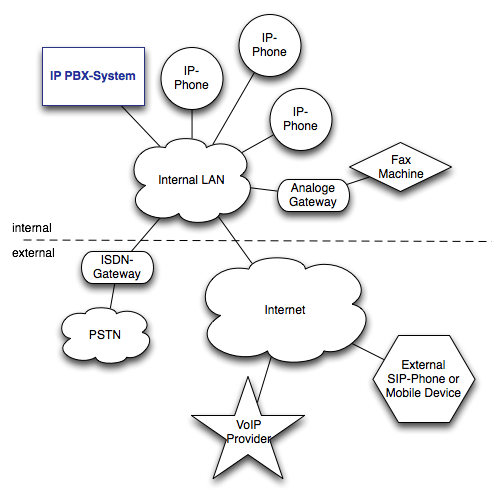
A typical PBX setup (shown above) consists of:
- Multiple phone lines connected to the PBX
- A computerized switching unit that routes and prioritizes call traffic, inbound and outbound
- An optional operator console for manual control and disaster recovery
- The network of internal lines connecting everyone’s phones
Businesses can host a PBX on-site or — far more common today — subscribe to a hosted cloud PBX for a monthly fee, skipping the hardware entirely. What the PBX approach buys you:
- One system for distributed teams — Remote employees, satellite offices, and field crews all connect to the same exchange. Customers see one company number; the PBX handles the routing behind the scenes.
- Extensions instead of extra lines — One main number splits into department and employee extensions, without paying for a separate line per person.
- Interactive call management — Auto-attendants, call queues, custom voicemail per person or department, and automated responses that make a five-person office sound like fifty.
- Free internal calling — Calls within the organization cost nothing, and conferencing and transfers come standard.
What is SIP?
You’ll see SIP mentioned alongside VoIP constantly, so let’s untangle it.
First, what’s a protocol?
A protocol is an agreed set of rules that lets devices exchange information — the shared language that makes a phone in Phoenix understood by a server in Chicago. The “IP” in VoIP is one; SIP is another that rides on top of it.
Session Initiation Protocol (SIP)
SIP is the protocol that sets up, manages, and ends multimedia sessions — voice calls, video calls, messaging. Developed by the Internet Engineering Task Force (the body that standardizes much of how the internet works), it borrows familiar patterns from web and email protocols like HTTP and SMTP, which is part of why it became the industry standard.
VoIP vs. SIP
Let’s burst the bubble: there is no “SIP vs. VoIP.” VoIP is the broad concept — voice over the internet. SIP is the most common way it’s implemented. If VoIP is “driving,” SIP is the specific make of car most people drive.
In a typical hosted VoIP setup, your provider runs the PBX in their cloud and your phones simply connect to their servers. With SIP trunking, you keep your own PBX, and SIP “trunks” replace the physical phone lines that once connected it to the outside telephone network. It’s the standard path for businesses that already own PBX equipment and want internet calling without replacing everything.
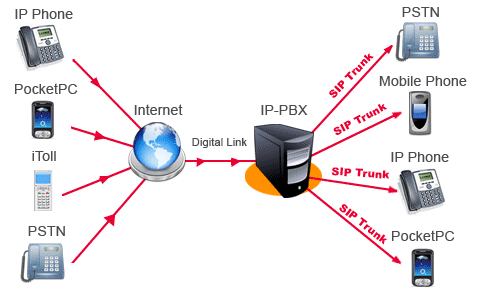
What do you need for SIP trunking?
- A SIP account — from your provider. For business use, choose a paid service with TLS encryption; your calls travel the open internet, and encryption is what keeps them private.
- A SIP client or SIP-enabled equipment — software or hardware that speaks the protocol: a softphone app, a SIP-capable desk phone, or your IP PBX.
- An internet connection with adequate bandwidth — voice needs surprisingly little per call, but quality and consistency matter more than raw speed.
What is a VoIP phone?
A VoIP phone is any device that places calls as digital data over the internet rather than analog signals over phone lines. They come in two flavors:
- Softphones — Software that turns a computer or smartphone into a phone. Zero hardware cost beyond a headset, and the modern versions are what most VoIP providers’ mobile and desktop apps actually are. The trade-off: they depend on the device they run on, so dedicated hardware still edges them out for business-critical reliability.
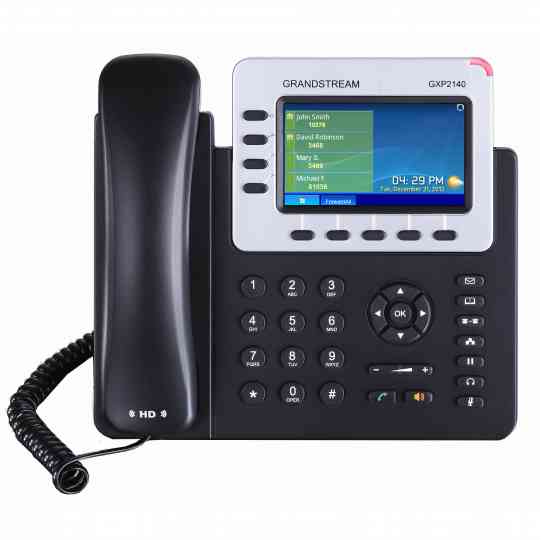
- Hardware IP phones — Purpose-built desk phones (or analog phones upgraded with an ATA) that connect straight to your network, often powered through the Ethernet cable itself (PoE). Manufacturers like Cisco, Poly, and Yealink dominate here. They scale cleanly and offer the most dependable call quality.
Many IP phones now include video, touchscreens, and Wi-Fi — a far cry from the desk phones they replaced.
Faxing over VoIP
Traditional faxing converts documents into sound and plays them over an uninterrupted phone connection — any hiccup kills the transmission. Since internet connections naturally have micro-interruptions, faxing was VoIP’s weak spot for years.
That’s largely solved. Modern VoIP faxing — through improved protocols and digital fax services — is reliable enough for regular business use, and most providers now include digital faxing that skips the fax machine entirely. For the full picture, read our guide to faxing over VoIP.
Latest Technical VoIP Guides

Bridging the Digital Divide: Supporting Poor & Rural Communities as Internet Speeds Ramp Up
American internet usage has been tracked since early 2000 and in the 20 years since then, usage has gone from around five in ten to nine in ten Americans today. Internet usage however, isn’t indicative of the quality or speed of the internet available and as we demand faster and faster broadband connections, the digital…

Important VoIP Headset Features to Consider
If you’re thinking about implementing VoIP solutions into your company, or you already have, you’ll want to consider the main features to lookout for when finding the best headsets. There are a range of characteristics involving VoIP headsets, however, you’ll want to know more about the key elements to make sure that you’ve got headsets…
VoIP vs VoLTE: What are the Differences?
Are you wondering what the differences between VoIP and VoLTE are? If so, you’re in the right place as we’re about to take you through the rundown of what these services are and how their features differ from one another. VoIP is Voice Over Internet Protocol and VoLTE is ‘Voice Over LTE’ or ‘Voice Over…

How BYOD Encourages VoIP Migration
An increase in BYOD has lead to more businesses integrating unified communications with VoIP systems. BYOD stands for bring your own device and is something that companies are starting to let their employees do on a more regular basis. For the most part, this can have a lot of benefits and boosts the number of…

VoIP Security Threats & Prevention Methods
VoIP communications and UCASS / CPASS have increased in popularity among businesses over the years and are continuing to grow. It can help your communications to run smoother, while also minimizing the costs. However, there are some security issues that you should be aware of. The reason as to why VoIP has potential security vulnerabilities…
All About SIP Protocol Calling & Trunking
SIP stands for Session Initiated Protocol and it has been around for decades. It started out as a way for developers to have a system that keeps people connected over the internet. To learn more about SIP trunking and calling, how it’s related to VoIP, how secure the system is, the trends, and more, check…

How UCASS & CPASS Are Transforming the Way We Communicate
The role of UCAAS and CPAAS are having a larger effect on the way that businesses communicate. These advancements in technology are on the rise and it’s leading to an increasing number of businesses, both large and small, integrating cloud-based communication services into the way that they run their company. It used to be that…

Mobility & VoIP: Integrating Business VoIP
Over time, traditional business phone systems have been gradually ushered out while VoIP based systems have replaced them. These days, it’s not uncommon for a business to use VoIP for their primary means of communication. However, there are still people who haven’t made the switch yet, partly because they don’t understand enough about VoIP yet.…

Internet Telephone Service: What Are Internet Phone Calls?
What is Internet Telephone Service? There is a common misconception about the difference between Internet phone service and VoIP but we’re here to help clear this up for you as it’s actually quite simple. In the oft questioned comparison of Internet phone service vs. VoIP there is actually no difference, they are one and the same…

VoIP Savings: How Much Money Can You Save With VoIP?
Voice over Internet Protocol (VoIP) can stake genuine claims to being an alternative to traditional telephone systems today. High internet speeds available make internet telephony (internet phone service) an inexpensive, technically mature option, helping subscribers to dramatic cuts in long-distance/ international calling expenses and monthly phone bills. With the deadline for filing tax returns upon…
![What Is VoIP? [Definition of VoIP And How It Works]](data:image/svg+xml;base64,PHN2ZyB4bWxucz0iaHR0cDovL3d3dy53My5vcmcvMjAwMC9zdmciIHdpZHRoPSIzMDAiIGhlaWdodD0iMjAwIiB2aWV3Qm94PSIwIDAgMzAwIDIwMCI+PHJlY3Qgd2lkdGg9IjEwMCUiIGhlaWdodD0iMTAwJSIgZmlsbD0iI2NmZDRkYiIvPjwvc3ZnPg==)
What Is VoIP? [Definition of VoIP And How It Works]
VoIP stands for Voice-over-Internet Protocol. It is an alternative solution for calling someone using a traditional analog phone service. Instead, it works by converting the voice into digital signals which are then passed on through the internet’s high speed network. Simply put, you don’t use traditional land-lines but instead utilize the infrastructure of the internet.…
![VoIP Free Calling [7 Ways to Make VoIP Calls for Free]](data:image/svg+xml;base64,PHN2ZyB4bWxucz0iaHR0cDovL3d3dy53My5vcmcvMjAwMC9zdmciIHdpZHRoPSIxMDI0IiBoZWlnaHQ9IjU3NiIgdmlld0JveD0iMCAwIDEwMjQgNTc2Ij48cmVjdCB3aWR0aD0iMTAwJSIgaGVpZ2h0PSIxMDAlIiBmaWxsPSIjY2ZkNGRiIi8+PC9zdmc+)
VoIP Free Calling [7 Ways to Make VoIP Calls for Free]
Bills. We hate them, but when it comes to utilities like our phones, we’re forced to pay them. But, if you’re shrewd, then you can take advantage of the seven free calling systems below, ditch your phone bill, and save lots of cash every month! Free All-Around Calling Google Voice: Google Voice is a computer…



![What Is VoIP? [Definition of VoIP And How It Works]](https://www.thevoiphub.com/wp-content/uploads/2015/01/bigstock-VOIP-Wordcloud-Concept-50797073-300x200.jpg)
![VoIP Free Calling [7 Ways to Make VoIP Calls for Free]](https://www.thevoiphub.com/wp-content/uploads/2018/12/Free-VoIP-Calling.jpg)