Update: With the rise of smartphones the magic App has become increasingly popular as a much more convenient way to keep your home phone number yet eliminate the actual physical device. Along with the app all you need is a smartphone so it essentially renders the PC softphone useless, unless of course you enjoy making calls through your computer.
Our Guide to the magicJack App for PC
If you like the magicJack (read our full review) VoIP phone device but would rather make calls directly from your computer then you are in luck because this can now be done with the companies magicJack for windows desktop application. With this new magicJack app for PC users now have the choice of either continuing to hook their phone up to the device or as an alternative make calls directly from their PC via an on-screen phone.
Note: If you’re using a MAC there is a version for your desktop that functions and look very similar though our primary focus in this post is to cover the Windows version of the desktop application.
Below you can see a picture of the softphone and a short explanation of its layout and how to use it. It is very easy to use and provides a way to reduce clutter and eliminate the need for a phone to be right at your computer desk. The PC softphone is also advantageous because these days many people do not have a landline telephone at their disposal so the magicJack would require them to go out and purchase one. It is however a windows softphone application and may slow your computer down and you will have to know how to uninstall it if you ever decide you don’t want to use it anymore.
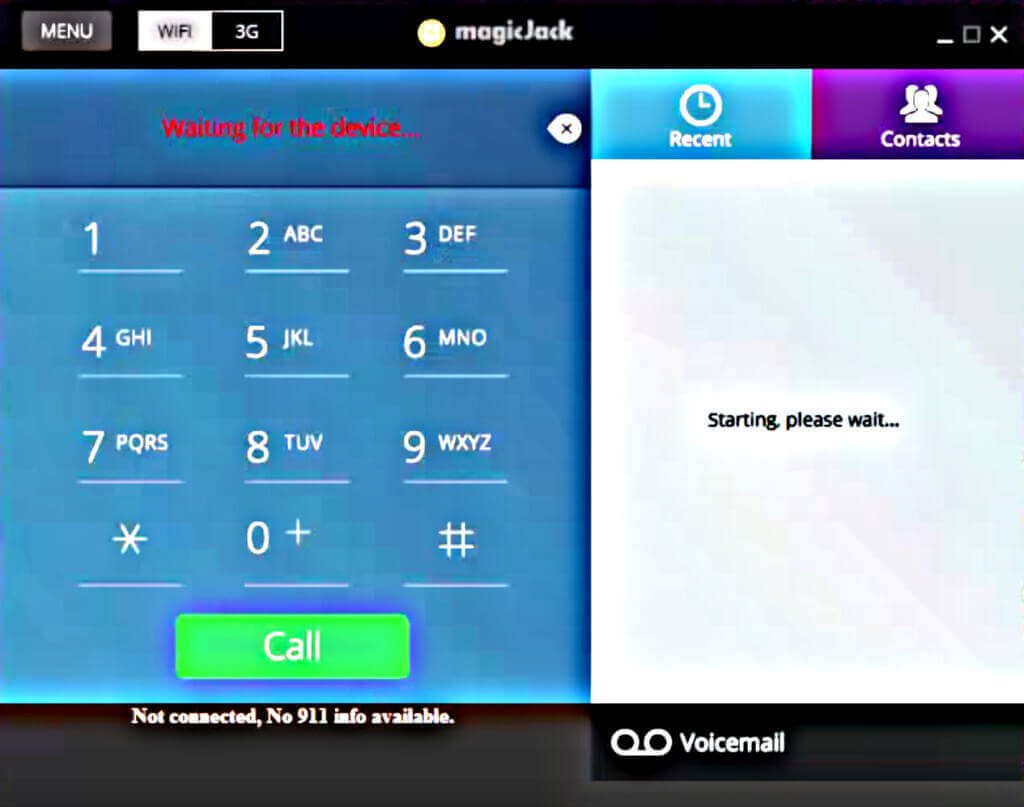
The layout of the software includes a the number pad on left for dailing out. This is the main portion of the software where the action takes place and it is quite easy to use. All you have to do is click the buttons related to the number you are trying to call. As they are clicked they will show up in the text box above the keypad. Once you have the phone number entered click the send button and your call will be initiated. Once finished talking simply click end and the softphone will end your call.
Just above the keypad is a little box that displays whether or not the device and its software are functioning properly and currently able to make calls. You should always take a quick glance at this screen in order to be sure your device is working before initiating a call.
To the right of the above mentioned screen is a white text box, contacts tab and recent calls. This area is your phone book. Here you can save any numbers to your phone and also look up recent calls that you have made via the softphone.
Above the phone book area is a minimize button and big button that allows you to minimize the windows application or make it bigger if needed. There is also a menu button that you can click on that will give you the PC softphone menu options.
Below the phone book is the voicemail button. Thisw buttons are pretty self explanatory.
Finally, and very important is the area along the bottom border. This area is the place where you enter your physical location (address) from which you make your calls. This is important because if you ever have a 911 emergency and call from your magic Jack it will allow them to locate you.
Where can I download the magicJack Windows or Mac Application?
Windows: http://upgrades.magicjack.com/upgrade/magicJackSetup.exe
Mac: http://upgrades.magicjack.com/upgrade/magicJackSetup.dmg
Conclusion to the magicJack Desktop Application for Windows
If you have a magicJack and like the idea of making calls directly from your computer then the magicJack desktop app for PC is a great piece of software and you’ll almost certainly love all of the awesome features it offers.
911 aside, what would prevent people from calling me at the usual number, if I have the (USB version) Magicjack connected to my laptop while I travel? Does that pose problems? Will it work transparently?
Is there anyway to find out if my area code or number will be local before buying the product I also would like a phone number and or mailing or email address to get more info from
Why not just add a face to face talk. You have the phone, can you just add a area so people can see each other, most people now have cams on the computers. Something like real time viewing……
Can I received collect call?? since they are charged to your phone bill, how would that be possible??
When you say that you can transfer your existing phone # to the new Magic Jack Plus for $19.95 do you mean my existing AT&T number or my existing magic jack #.??
Uh…what happens when lightning zaps your Magic Jack or your PC while you’re using the Softphone? What kind of warranty is on these things? It’s nice if it will work indefinately, but what modern device has a lifetime warranty?
Does Craftsman make a Craftsman Jack? Life time warranty: Bring ‘er back broke and we git yoo a noo one fer FAREE!! Yeper!!
* had to purchase another ATT disk and which changed my recorded number Can you or someone tell me how to activiate my phone a gain.